


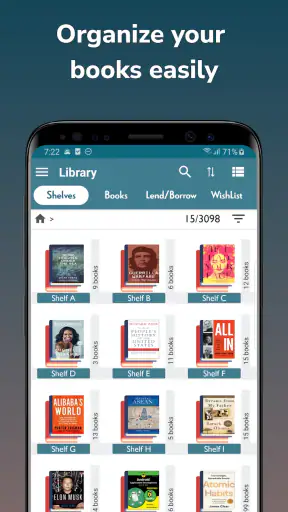
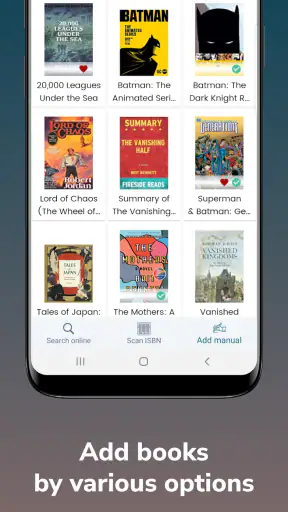
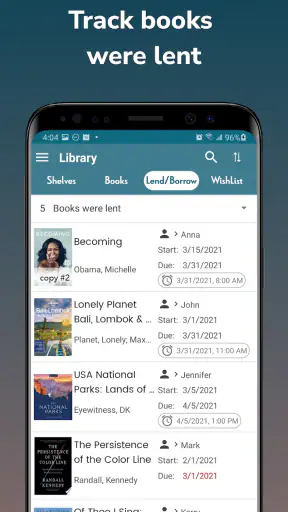
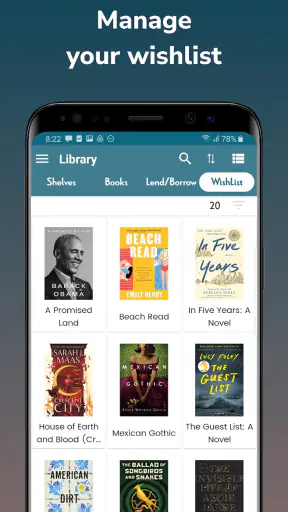
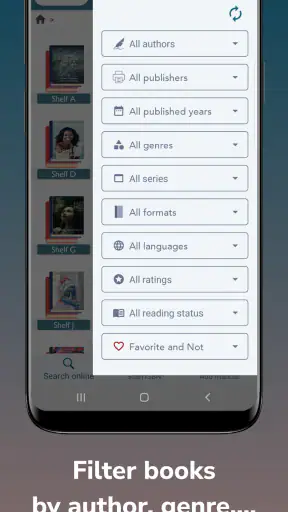
I like the idea behind Handy Library - Book Organizer because it addresses a problem that appears only after a personal collection becomes difficult to remember. A few books can live in a stack beside the bed, but once titles are spread across shelves, boxes, and reading lists, memory stops being a dependable catalog. This Books & Reference app from Bookshare Co., Ltd is designed to turn that collection into something searchable, using ISBN barcode scanning as the quickest way to add books.
After spending time with it, my impression is that it works best as a focused personal inventory rather than as a complete reading community or an elaborate digital bookshelf. It is free to install, suitable for Everyone, and has attracted over a million installs, so it is clearly aimed at ordinary readers rather than specialist librarians. Its average rating is 3.9 from around ten thousand ratings, which feels consistent with an app that solves a very specific organizational need but may not satisfy people looking for a broad reading platform.
How the cataloging workflow feels in everyday use
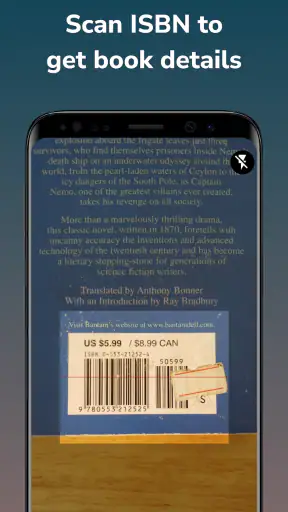
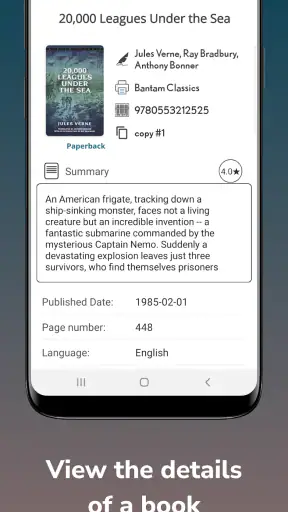
The most useful part of the experience is the basic capture routine. Instead of typing every title, author, and publication detail by hand, I can use an ISBN barcode scanner to begin building a record. That makes a noticeable difference when I am dealing with several books at once. The app’s purpose becomes especially clear during a shelf sort: scan a book, check the resulting entry, save it, and move to the next one.
I would not treat scanning as a replacement for checking each record. A barcode identifies an edition, and personal collections often contain older copies, translated editions, or books whose physical condition makes the code awkward to read. My practical advice is to scan in small batches and glance at each result before putting the book away. That habit prevents a tidy-looking catalog from quietly becoming inaccurate.
A realistic use case is moving house. I could work through one shelf at a time, scan the books before packing them, and later use the catalog to remember which box contains a particular title. The app is also useful when I am standing in a second-hand bookshop and want to check whether I already own a book. That is a more valuable benefit than simply having an attractive list: it can reduce duplicate purchases.
Another good workflow is to catalog only the books that matter first. I would begin with books I lend frequently, titles stored in different rooms, and anything I might buy again. Trying to register an entire large collection in one sitting can turn an otherwise simple app into a chore. The scanner makes entry faster, but it does not remove the physical work of handling every book or the mental work of correcting an imperfect match.
Where its speed matters most
For a small collection, the app should feel naturally quick because the central task is straightforward: identify a book and place it in an organized record. The biggest speed advantage comes from avoiding manual entry, not from having a long list of advanced tools. If I only need to add a few books after buying them, the workflow is easy to fit into an ordinary evening.
The experience changes when the collection becomes large. Scanning dozens of books means repeating the same actions, checking results, and dealing with books that do not scan cleanly. That is where the difference between a convenient catalog and a full inventory system becomes apparent. Handy Library is appealing for steady, occasional organization; it is less attractive if I expect to process an entire library in one intense session.
I also think the phone itself has more influence on perceived speed than the app’s concept suggests. A newer device with a responsive camera should make barcode capture less frustrating than an older handset with a slow camera or a worn lens. Good lighting and a clean barcode matter too. I would not blame the app for every failed scan, but I would plan for occasional retries rather than expecting every book to register instantly.
There is a useful trade-off here. A barcode-first approach is faster and more consistent than typing, but it is dependent on the physical book and its code. A manual catalog can be more flexible for unusual items, handwritten notes, or books without a convenient ISBN, while this app’s main strength is reducing the effort for standard printed books.
What happens during heavier cataloging sessions
Heavy use for this app is not the same as heavy use for a game or video editor. The demanding moment is a long scanning session, especially when I am sorting several shelves or preparing a move. I would expect the phone’s camera to be active repeatedly, and that makes the device’s battery level and temperature more relevant than they would be during a quick one-book update.
My best practical approach would be to work in short groups rather than scanning continuously for hours. Ten or fifteen books at a time is easier to verify, easier to correct, and less likely to leave me with a confusing pile of unsaved or questionable entries. It also gives me a natural recovery point if the app needs to be closed or the phone becomes uncomfortable to hold.
The app’s current version is 3.0.3, and that is worth noting for anyone comparing an older phone experience with a newer installation. Still, a version number alone does not guarantee identical behavior on every device. Android hardware varies widely, particularly in camera focus, available storage, and background memory. I would keep the operating system reasonably current and avoid judging the whole workflow from one difficult book with a damaged barcode.
One non-obvious limitation of batch work is attention. The scanner may make the physical capture quick, but the catalog is only useful if the information attached to each book is correct. If I rush through a large pile, I may later spend more time fixing mistakes than I saved at the beginning. The app rewards a rhythm of scan, inspect, and continue rather than scan everything blindly.
Stability, interruptions, and getting back to work
For a personal library tool, reliability means more than avoiding a visible crash. I want to know that an interrupted session will not make me unsure which books were already recorded. The safest habit is to treat every completed entry as a checkpoint: after scanning and reviewing a book, confirm that it has been saved before moving it into a finished pile.
This is particularly important when I am cataloging books away from a desk. A phone call, low battery, accidental screen lock, or a need to switch apps can break the rhythm. I would divide the collection into physical groups and keep the “not yet checked” books separate from the completed ones. That simple method gives me a clear recovery path even if I have to stop unexpectedly.
I would also avoid making the app the only record of a valuable collection until I have used it long enough to understand my own workflow. For ordinary household organization, it can be a convenient central list. For rare books, insurance documentation, or a collection that has financial importance, I would keep an additional record of the details that matter most. That is not a criticism of the scanning idea; it is sensible caution whenever one mobile catalog becomes the sole reference point.
The app’s 786 written reviews suggest that users have had enough experience to form opinions beyond a first launch, while the less-than-perfect average rating indicates that the fit is not universal. I read that as a reason to set realistic expectations. This is a practical organizer, not something I would choose because I want a polished social reading environment or an elaborate research database.
Older phones and everyday device constraints
Handy Library supports Android 7.0 and later, which makes it accessible to people who do not own a recent phone. That broad compatibility is helpful for a device kept mainly for household tasks. At the same time, the minimum operating system does not tell me how smoothly the scanner will behave on every older handset. Camera focus, lighting performance, and general responsiveness can vary substantially between models.
Storage should not be a major concern for a modest catalog, but readers with a very large collection should still keep an eye on available space and general phone health. The app is centered on book records rather than demanding media files, yet a nearly full or heavily burdened device can make any cataloging session feel less responsive. Closing unrelated applications before a long scanning session is a small step that may make the experience more comfortable.
Screen size also changes the experience. On a compact phone, reviewing book details and correcting an entry may require more scrolling and tapping. On a larger screen, the catalog should be easier to inspect at a glance. I would particularly value a larger display when checking whether a scanned edition is the one I actually own, because that is the point where accuracy matters more than raw scanning speed.
People who are uncomfortable granting a cataloging app access to the camera may also find the central workflow less appealing. The barcode scanner is the reason to choose this product over a plain notes app, but it also means the phone’s camera becomes part of the routine. Anyone who prefers typing, already maintains a spreadsheet, or wants a catalog independent of a particular mobile device may be better served by a more manual system.
Free access and the paid extras question
The app is free, which makes it easy to test with a small personal collection before committing to a bigger cataloging project. There are in-app purchases ranging from about one dollar to fifteen dollars per item. Because of that, I would explore the free experience first and decide whether the basic workflow already covers my needs before paying for anything.
This pricing structure matters for readers who only want a simple household list. If I am cataloging a few shelves, a free starting point may be enough. If I expect advanced convenience or a larger organizational setup, I would consider the cost in relation to how often I will actually use the app. A paid addition is worthwhile only when it removes a repeated annoyance, not merely because it exists.
I would also distinguish between owning a catalog and actively maintaining it. The initial scanning session is the visible task, but the long-term value comes from updating the list when I lend, donate, replace, or relocate books. If I am not willing to keep the records current, paying for extra functions will not fix the underlying problem. The app is strongest when it becomes a small habit attached to buying and rearranging books.
Who should use it, and who should look elsewhere
I would recommend it to readers who have a physical collection, regularly forget which titles they own, or want a faster alternative to typing a catalog from scratch. It is also a sensible choice for families sharing shelves, provided everyone agrees on how books should be recorded. The barcode approach is especially useful for standard printed books with readable ISBNs.
I would be more cautious if my collection is mostly magazines, handwritten notebooks, imported editions, or books with damaged codes. The app may still be useful, but the main convenience becomes less consistent. People seeking detailed academic metadata, extensive reading analytics, social recommendations, or a cloud-centered collection experience should compare it with specialized library and reading services instead of assuming a barcode organizer will cover all those needs.
A spreadsheet remains a better option for someone who wants complete control over custom columns, lending dates, replacement values, or personal notes. A notes app is faster for a very small list. A dedicated social reading platform is more appropriate for discovering what to read next and discussing books with others. Handy Library occupies a narrower but useful middle ground: it is about identifying and organizing the books already in my possession.
My performance verdict after using the concept in real routines
My overall view is positive, but deliberately practical. Handy Library - Book Organizer is not impressive because it tries to do everything; it is useful because it focuses on the repetitive first step of building a physical book catalog. The ISBN scanner can save substantial typing, and the free entry point makes it reasonable to test without reorganizing an entire collection immediately.
Its perceived performance should be strongest during short, well-lit scanning sessions on a reasonably responsive phone. Longer sessions expose the real trade-offs: repeated camera use, occasional difficult barcodes, manual checking, and the need to keep track of what has already been processed. I would call it efficient for gradual cataloging rather than a guaranteed high-speed solution for a thousand-book weekend project.
For recovery, I would work shelf by shelf, verify each record, and maintain a physical separation between finished and unfinished books. That workflow is more important than chasing maximum scan speed because it protects the accuracy of the catalog when the session is interrupted. It also makes it easier to identify a book that needs another attempt.
Bookshare Co., Ltd has made a focused Books & Reference app that should appeal to people who want their shelves to become searchable without learning a complicated library system. It carries an Everyone age rating and has been available since August 2018, giving it a long enough presence to feel like an established option rather than a brand-new experiment.
My recommendation is to try it if your main frustration is remembering what you own. Start with one shelf, test how reliably your phone reads the barcodes, and see whether reviewing the resulting entries feels manageable. If that small trial fits your habits, the app can become a genuinely helpful household catalog. If you need deep customization, social reading features, or a fully independent archival record, I would choose a more specialized alternative instead.


